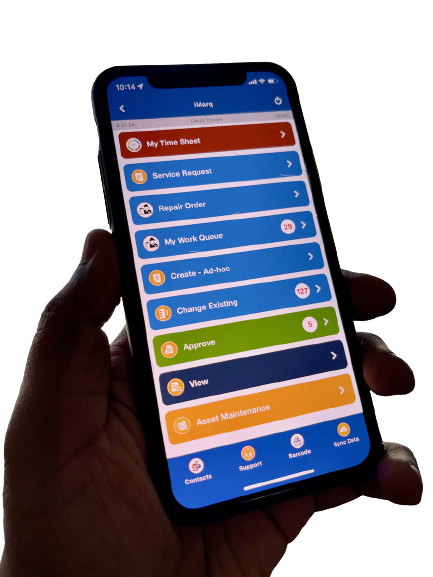

iMarq seamlessly integrates with RTA via RTA’s standard API, covering Work Orders, DOT Inspections, Parts Consumption, and Inventory/Parts lookup. This integration empowers mechanics to perform tasks in the field using mobile devices, enriching their work with images and language translations, and generating DOT-compliant reports that are then pushed into RTA. Additionally, it provides real-time visibility of parts data from RTA, allowing mechanics to track inventory and alert purchasing teams about part shortages. These capabilities collectively enhance asset uptime and improve maintenance efficiency.
Now extend RTA’s power directly to your technicians with Connixt iMarq. As a mobile-first application, iMarq is purpose-built to simplify tasks for the crew on the shop floor and in the field, integrating seamlessly with your existing RTA software.

Even with a robust system like RTA, traditional shop floor processes can create bottlenecks and inefficiencies:
Lost “Wrench Time”: Technicians often have to walk back and forth to a shared computer kiosk to clock in/out of jobs, check work orders, or look up parts.
Paper-Based Problems: Using paper inspection forms and repair orders leads to illegible handwriting, lost documents, and delays in getting critical data entered into RTA.
Delayed Data: Information about completed work, parts used, and inspection results is often entered into RTA hours—or even days—after the fact, meaning your core system isn’t truly live.
Data Entry Errors: Manually transcribing information from paper into RTA inevitably leads to mistakes, impacting everything from inventory counts to maintenance history and compliance reporting.
Connixt iMarq bridges the gap between your technicians and your RTA software. Using a secure, real-time integration, iMarq puts the essential functions of RTA onto a user-friendly mobile app that runs on any standard smartphone or tablet. This creates a direct, two-way data flow, ensuring that your RTA system is always perfectly in sync with the work happening on the floor.

Technicians can receive, start, pause, and complete RTA work orders directly from their mobile device. They can record labor, add detailed notes using speech-to-text, and attach annotated photos to document repairs.
This dramatically increases technician productivity by eliminating trips to the kiosk. It also ensures that rich, accurate data is captured and instantly saved to the work order in RTA.
Convert all your paper-based inspection forms (including DOT-required DVIRs and PM checklists) into easy-to-use digital forms within iMarq.
You get faster, more accurate inspections with clear, legible results. This creates a solid, searchable digital audit trail, simplifying compliance reporting for regulations like DOT. Failed inspection points can automatically trigger new work orders in RTA, ensuring defects are addressed immediately and compliance is maintained.
Technicians can look up parts and record usage in real-time as they perform repairs. Using the device camera for barcode scanning ensures the correct part is logged against the correct job.
Your RTA inventory levels are updated instantly, eliminating discrepancies between the shelf and the system. This leads to better parts management, fewer stockouts, and more accurate job costing.
Enrich your data by collecting information not typically stored in RTA but relevant to operations. iMarq allows technicians to capture annotated photos, videos, audio notes, GPS locations, and detailed checklist responses.
This contextual data provides a complete, visual story of the work performed. While RTA remains the system of record for core data, this enriched information can be linked to the work order, providing invaluable context for warranty claims, training, and operational analysis without cluttering your core RTA database.
Capture tire pressure and tread depth readings digitally in the yard using iMarq. This data can flow directly back to the asset’s record in RTA.
Streamlines a time-consuming but critical task, helping you maintain a more effective tire management program and ensuring the data in RTA is always current.
Configure required field validations within iMarq to ensure all necessary data points are captured correctly during work order creation or updates.
Guarantees that information entering TruckMate is complete and accurate from the source, improving data integrity across your systems.
By integrating Connixt iMarq with your RTA Fleet Management Software, you connect your powerful back-end system directly to your front-line technicians. You’ll eliminate paper, automate data entry, and empower your crew with the mobile tools they need to work more efficiently. The result is improved data accuracy, increased wrench time, stronger compliance, enriched operational data, and a greater return on your investment in RTA.